What is an external apply link on a job post?
An external apply link is the address a job board's Apply button opens, so candidates apply on your page, not the board's form. LinkedIn lets you set one; some Naukri jobs carry one, but Naukri doesn't say how to add it, who sets it or whether it costs extra. Use one to keep every application in one place.
It is where stage 2 of the candidate screening process for recruitment agencies starts: CVs from every board arrive in one pile and get the same two passes.
It is worth setting up when you post the same role on several boards and want one list, one form and one consent step. For a single board and a few dozen responses, the board's own inbox does the job.
What the candidate sees differs by board. On LinkedIn they press Apply with an external link icon (LinkedIn Help, application flow, read 11 Nov 2026). On Naukri they see an Apply on Company Website button, which takes them to the company's career page, where they can't apply with their Naukri profile (Naukri's job-seeker FAQ, read 11 Nov 2026).
Make your apply page quick to finish on a phone, because the candidate has just left an app that already had their details.
How do you add an external apply link to a LinkedIn job post?
On LinkedIn's Job settings step, set Manage applicants to On an external website and paste your apply link in Website address, which LinkedIn marks as required. LinkedIn's help says the collection method can't be changed after the job is posted, so paste the final link before you post.
Set Manage applicants first; the Website address field appears for the link.
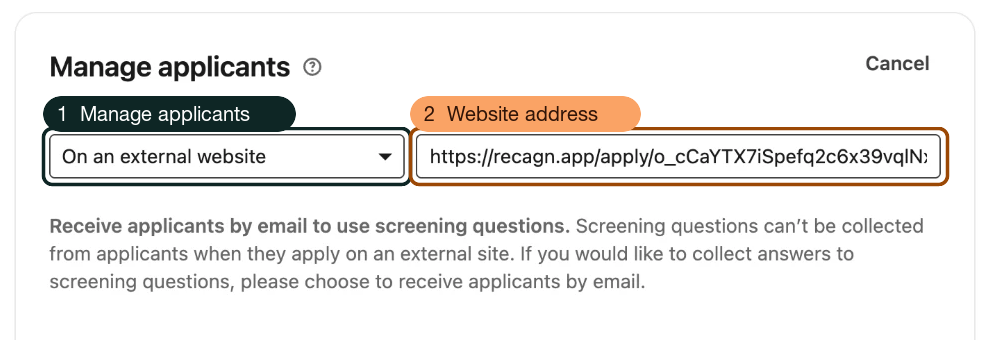
- Manage applicants Choose On an external website.
- Website address Paste the role's LinkedIn apply link from Recagn. LinkedIn marks the field required (Website address*).
- Start the job post and fill in the details up to Job settings.
- Make the two changes numbered in the figure, with a link made for LinkedIn alone.
- Move any screening questions to your own apply page.
- Post the job, then open it as a candidate would and press Apply once.
LinkedIn's note under those fields says screening questions can't be collected when people apply on an external site. That is the screen as captured on 11 Nov 2026, so whatever you need to ask goes on your own apply page.
The method is fixed once the job is live. LinkedIn's applicant options page says the collection method "cannot be changed after posting your job" (read 11 Nov 2026). It doesn't say whether the address itself can be edited, so treat the link you paste as permanent.
If the external option isn't offered, the same page says LinkedIn is still verifying your account and asks you to try again in 7 business days.
Once candidates apply off LinkedIn, LinkedIn keeps no record of who applied, and Job Analytics won't show how many did (application flow, read 11 Nov 2026). Your own apply page is the only count you will have.
LinkedIn's help names the field "Direct applicants to an external site to apply", and some vendor guides use older labels. The labels here are the posting screen as of 11 Nov 2026; LinkedIn Recruiter may show others.
Can you add an external apply link to a Naukri job post?
Yes, some Naukri jobs send candidates to the company's own page through an Apply on Company Website button. Naukri's recruiter posting guide and job-posting FAQ, read 11 Nov 2026, don't say how to add one, who sets it or whether it costs extra. Ask your Naukri account manager before you plan around one.
Everything else that is public comes second-hand. A Naukri Recruiter Zone post on sending candidates to your own site gives applyintegration@naukri.com as the contact. We saw that only in a search result, because the post needs JavaScript to load.
One integration vendor, Talkpush, says redirecting Naukri candidates to another site needs "an additional feature or a plug-in", and sends readers to their Naukri account manager (read 11 Nov 2026). That is Talkpush's account, not Naukri's. Other third-party pages describe the set-up differently, and Naukri publishes no price for it.
Questions to take to your Naukri account manager:
- Is Apply on Company Website in my subscription, or an add-on, and at what price before GST?
- Which job posting types can carry it?
- Who enters the link, me or Naukri, and how long does that take?
- Can the link be changed after the job is live?
- Does the questionnaire still apply, and do responses still reach Response Manager?
- Does Naukri add anything to the link, such as a tracking parameter?
If it isn't on your plan, keep Naukri's own Apply button and bring the CVs in from Response Manager yourself.
What breaks after the job is posted?
The link has to keep working for as long as the post is live, because LinkedIn won't let you switch the collection method afterwards. If you replace or delete it in your own tool, candidates who press Apply reach a dead page. Check it before posting, and again before the post closes.
Three habits keep any apply page working, whichever tool made it:
- Give each board its own link. Once a board stops counting, the link is the only reliable record of where a candidate came from. Count applications submitted, not page visits, because link previews and email security scanners open pages before people do.
- Make sure the page still loads when something is added to the link. LinkedIn Recruiter's applicant source tracking, for one, adds a parameter such as source=linkedin to apply URLs (LinkedIn Recruiter Help, read 11 Nov 2026). That is a Recruiter feature, set up by Recruiter customers.
- When the role closes, pause the link so it says the role is no longer accepting applications. Don't delete it.
How Recagn does this
Recagn is our product. Recagn gives a role one apply link for each place you share it: LinkedIn, Naukri, Indeed, WhatsApp, Email, Careers page, or a name you type. The links appear once the role's scorecard, which Recagn calls a rubric, is locked.
They wait for the lock because the CVs that come in are read against the rubric. You still decide who is invited. Recagn does not post the job for you.
The board's link opens a page built for a phone first. It shows the role, and "Confidential client" in place of the client's name unless you choose to show it. The candidate uploads a CV as a PDF or Word file up to 5 MB, gives a name and email, with phone optional, and ticks consent.
Opening the page records nothing. The page reads only the link's own code, so anything a board adds to the address is ignored and the page still loads.
Recagn counts an application under its link's board when the candidate submits it. The Apply Links sheet shows each source with Applied, Confirmed, Interviewed and Selected, plus rows for Direct and Matched by Recagn.
That matters most on LinkedIn, where the method can't change after posting. Replace stops a link at once: anyone who opens the old one sees "no longer accepting". So replace a LinkedIn link only if you will also repost the job with the new one.
Pause applications works on the whole role. Every link for it shows "This role is no longer accepting applications" until you press Resume applications, and then the same links work again. Every source's link behaves this way; LinkedIn is singled out only because of its rule.
Each stop gives Recagn's part, then yours. Nobody is contacted until you confirm, and the last stop is only yours.
- Naukri postMakes the locked role an apply link for Naukri, and one for each other place you share itYou post the role and paste the link. Recagn doesn't post for you.
- AppliedTakes the CV and consent on a phone-first page, adds the candidate to the role's Pool and reads the CV against the rubric
- ConfirmRecommends Strong, Possible or Weak, with a one-line reasonYou confirm and invite, or reject. Nobody is contacted before you confirm.
- InterviewAsks every candidate the same questions, at an hour they pick, and scores each criterion 1 to 5, quoting the answer it rests onYou set the questions and hard gates before you lock the rubric
- ShortlistRecommends a bucket for each candidate and drafts the client reportYou set each candidate's decision and choose when the client gets the link. Only you reject.
Per source: Applied · Confirmed · Interviewed · Selected
The figure follows one role from the Naukri post to the client shortlist. Recagn reads each CV against the rubric and recommends Strong, Possible or Weak. Nobody is contacted until you confirm and invite, and only you reject a candidate.
One apply link for each place you share the role, and a count per board, come off your plate. Where you post it, and when to pause applications, stay yours.
Reading every CV that comes in through the links against the rubric comes off your plate. Who is invited stays yours.
For how this fits a placement consultancy's week, from Naukri post to client shortlist, see placement consultancy software from Recagn.
Questions people ask
Does an external apply link cost extra on LinkedIn or Naukri?
LinkedIn's help pages list no charge for it, and Naukri publishes no price, so ask your Naukri account manager. LinkedIn offers it before you choose whether to promote the job, and its free-versus-promoted comparison doesn't list it (read 11 Nov 2026). Recagn's apply links come with every plan; each CV read draws on the plan's monthly allowance, a senior-tier read counting as two (Recagn pricing).
Can I change the apply link after the LinkedIn job is posted?
Not the method. LinkedIn says the applicant collection method can't be changed after posting (read 11 Nov 2026). Its help page doesn't say whether the address itself can be edited, so treat the link you paste as permanent and check it before you post.
Can I use my ATS's apply link instead, such as Recruit CRM's?
Yes. Recruit CRM's help centre tells its users to paste its Job Application URL into LinkedIn's Website address field (read 11 Nov 2026), the same field any apply link goes in. If your ATS can give you more than one link for a job, use a separate one for each board.
Does Recagn post the job to Naukri or LinkedIn for me?
No. You post the role yourself and paste the role's Recagn apply link into the post. Recagn has no job-board integration and doesn't search Naukri's CV database. Recagn reads the CVs that arrive through the link, and you decide who is invited.
Why can't I add screening questions to a LinkedIn job with an external apply link?
Because the candidate applies on your page, not LinkedIn's. LinkedIn's Job settings screen says screening questions can't be collected when people apply on an external site (captured 11 Nov 2026). Put the questions on your own apply page, or in the first-round interview.